

Description
Download Meridian Player APK – Android Multimedia Player, Free Music & Video App
Overview
Meridian Player is a free multimedia application designed for Android devices, developed by Romulus Urakagi Ts'ai under the Sais Workshop brand. The software serves as a versatile media player, enabling users to enjoy both audio and video content with a focus on simplicity and intuitive navigation. It is particularly suited for individuals seeking a streamlined experience for managing music libraries and watching videos without the complexity of feature-heavy alternatives. The app supports a wide range of audio formats, including MP3, OGG, FLAC, and others, making it a practical choice for users with diverse media collections. Video playback is also supported, with compatibility for various formats and the ability to handle subtitles, enhancing the viewing experience. Its ergonomic interface is designed to minimize user effort, allowing quick access to playlists, albums, artists, and individual tracks. Real-world use cases include daily music listening, offline video consumption, and organizing personal media libraries on mobile devices. The absence of ads in the free version adds to its appeal for privacy-conscious users.
Key Features & Capabilities
- Multi-format Audio Support – Plays popular audio formats such as MP3, OGG, FLAC, and more, ensuring compatibility with a wide range of music files.
- Advanced Music Management – Allows users to edit metadata tags, assign ratings to tracks, and organize songs into custom playlists.
- Integrated Video Player – Supports video playback in various formats, with built-in subtitle handling for enhanced viewing.
- Intuitive User Interface – Features a clean, ergonomic design that simplifies navigation and media control.
- Playlist Creation & Organization – Enables users to create and manage playlists by artist, album, or individual songs for personalized listening.
- Offline Media Access – Fully functional without internet connectivity, ideal for use on the go or in areas with limited data access.
These capabilities allow users to manage their media libraries efficiently, whether they are listening to high-resolution audio or watching videos with subtitles. The ability to edit tags and assign ratings makes it a useful tool for music enthusiasts who want to curate their collections. The interface’s simplicity ensures that users can focus on content rather than complex settings, while the lack of ads enhances the overall experience. The app’s versatility makes it suitable for both casual listeners and more dedicated media users.
User Interface, Workflow & Performance
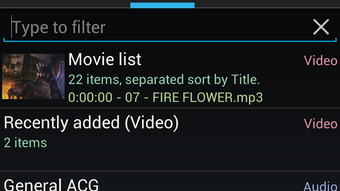
Meridian Player presents a clean and user-friendly interface, emphasizing ease of access and minimalistic design. Navigation is structured around core media categories—artists, albums, songs, and playlists—allowing users to browse their library with few taps. The workflow is optimized for quick playback initiation, with intuitive controls for play, pause, skip, and volume adjustment. The developer did not specify resource usage details, so performance behavior in terms of CPU or RAM consumption remains unspecified. However, based on general software behavior patterns, the app is expected to operate smoothly on modern Android devices with sufficient memory and processing power. Stability during extended playback sessions was not reported, but the app’s design suggests reliability in standard usage scenarios. The absence of advertisements contributes to a consistent and uninterrupted user experience. Overall, the interface prioritizes functionality and accessibility, making it suitable for users of varying technical skill levels.
Compatibility & System Requirements
Meridian Player is designed for Android operating systems, though specific version requirements were not provided. The application is available as an APK file, indicating it can be installed on Android devices that support sideloading. Installation size information was not specified, so exact disk space usage remains unknown. The developer did not list hardware requirements, so compatibility with specific devices or processors cannot be confirmed. Platform compatibility information is limited to Android, and no support for other operating systems such as iOS, Windows, or macOS is mentioned. Users should ensure their device meets general Android standards for app installation and media playback. The lack of detailed system requirements means users may need to test the app directly on their device to confirm functionality.
Pros and Cons
Pros
- Free to download and use with no advertisements
- Supports a wide range of audio and video formats
- Intuitive, ergonomic interface designed for ease of use
- Advanced music library management with tag editing and ratings
- Built-in subtitle support for video playback
- Offline functionality without internet dependency
Cons
- Exact system requirements were not listed
- Installation size and resource usage details not provided
- No official app store availability mentioned (APK-only distribution)
- Compatibility with older Android versions not confirmed
- Limited information on update frequency or long-term maintenance
FAQ Section
Is Meridian Player available on the Google Play Store?
The developer did not specify whether Meridian Player is available on the Google Play Store. The app is distributed as an APK file, which suggests it may be offered through third-party sources.
Can I use Meridian Player without an internet connection?
Yes, Meridian Player functions fully offline. All media playback, playlist management, and file access occur locally on the device, making it ideal for use without internet access.
Does Meridian Player support subtitles for videos?
Yes, the app includes built-in subtitle support, allowing users to view synchronized captions during video playback.
Is Meridian Player secure to download?
As a free APK, Meridian Player should be downloaded from trusted sources to minimize security risks. Users are advised to verify the authenticity of the file before installation.
What types of audio formats does Meridian Player support?
Meridian Player supports popular audio formats including MP3, OGG, FLAC, and others, ensuring broad compatibility with common music files.
Final Thoughts + CTA
Meridian Player stands out as a capable, lightweight multimedia solution for Android users who value simplicity and functionality. With its support for multiple audio and video formats, advanced music management tools, and ad-free experience, it offers a compelling alternative to mainstream media players. While detailed system requirements and performance metrics are not available, the app’s design suggests reliable performance on modern devices. It is especially beneficial for users who manage large music libraries, enjoy offline video watching, or prefer a clean interface without distractions. For those seeking a free, secure, and efficient media player on Android, Meridian Player delivers strong value. Download Meridian Player now.
Guides & Tutorials for Meridian Player APK
How to install Meridian Player APK
- Click the Preview / Download button above.
- Once redirected, accept the terms and click Install.
- Wait for the Meridian Player APK download to finish on your device.
How to use Meridian Player APK
This software is primarily used for its core features described above. Open the app after installation to explore its capabilities.
User Reviews for Meridian Player APK 0
No reviews found





